


Masked Aadhaar: How to Download, Use and Store Aadhaar Copies Safely
Masked Aadhaar hides the first 8 digits of your number. See how to download it from UIDAI, when to share it, what never to do with an Aadhaar copy, and where to keep it safe.
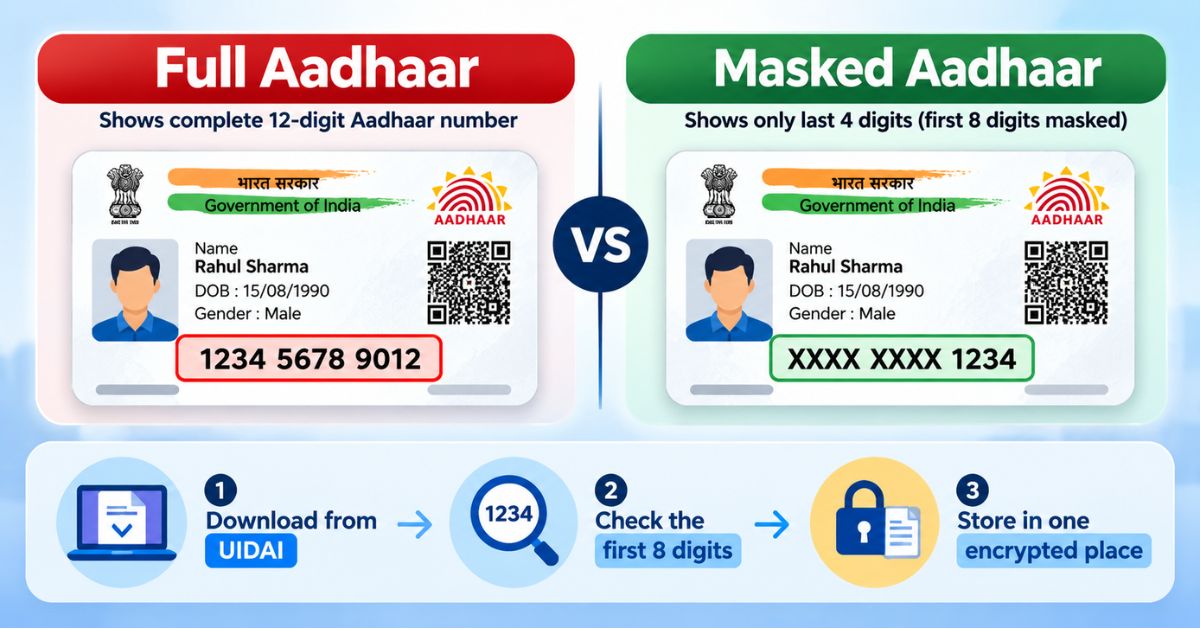
A masked Aadhaar is a copy of your Aadhaar where the first eight digits of the 12-digit number show as XXXX XXXX and only the last four are visible. You can download it from the UIDAI myAadhaar portal using an OTP sent to your registered mobile number. Share this version instead of the full one wherever it is accepted.
You check in at a hotel and the desk asks for a photocopy of your Aadhaar. A gym wants one for membership. A coaching centre asks for your child's. Each copy carries your full 12-digit number, and you rarely know where it ends up. A masked Aadhaar reduces that risk with one small change. This article shows you how to download it, when to use it, where to store your Aadhaar copy and what to avoid.
Last updated: October 2026
What is a masked Aadhaar and how is it different from a full copy?
Your Aadhaar number has 12 digits. In a masked Aadhaar, the first eight are replaced with XXXX XXXX, so only the last four can be read. Your name, photo, address and other details on the letter still appear, so the person checking can still match you to the document.
Think of the card receipt that shows only the last four digits of your debit card. Someone who sees it has much less to work with than someone holding the full number.
Masking does not make the copy harmless. Your name, address and photo are still personal data, so the copy still needs care.
How to download masked Aadhaar from the UIDAI website
Keep your phone with you before you start. The OTP goes to the mobile number linked to your Aadhaar. The screens may look slightly different when you try, because portals get updated.
- Open the official site. Type myaadhaar.uidai.gov.in into your browser yourself. Do not tap links in SMS messages, ads or social media posts, because fake download sites exist.
- Choose "Download Aadhaar". Log in with your Aadhaar number, Virtual ID (VID) or Enrolment ID, then enter the captcha.
- Select the masked option. Look for the checkbox that asks whether you want a masked Aadhaar. If you skip it, you may get the full number.
- Request the OTP. Enter the code sent to your registered mobile number. Never read it out to anyone, including a caller who says they are from "support".
- Download the PDF. It is saved to your device, usually in the Downloads folder.
- Check the number. The first eight digits should show as XXXX XXXX, followed by four visible digits. If you see all 12, download again with the masked option ticked.
- Move and delete. Put the file in secure storage, then delete it from Downloads and from any shared or public computer.
Verify with the official source (UIDAI, uidai.gov.in) before acting, since the steps can change.
What is the password for the masked Aadhaar PDF?
The downloaded PDF is usually password-protected. The commonly used format is the first four letters of your name in capitals, followed by your year of birth in four digits. For example, Ravi Shah, born in 1990, would try RAVI1990.
If it does not open, check the instructions shown on the UIDAI download page, because the format can change. When you email the file, send the password in a separate message, never in the same one.
Can you get a masked Aadhaar another way?
UIDAI's mAadhaar app and DigiLocker also let you access your Aadhaar. What each app offers, including masking, can change over time, so look for the option inside the app or on UIDAI's help pages. The website method above is the one most people find simplest.
When should you use a masked Aadhaar and when do you need the full number?
The simple rule is this: if someone only needs to see that you are you, a masked copy should do. If a legal or regulated process needs the full number, you may have to provide it, but only through a proper channel.
| Situation | Usual choice | Why |
|---|---|---|
| Hotel or guest house check-in | Masked copy | They need to see your identity, not store your full number. |
| Gym, coaching class or school form | Masked copy | These copies sit in files and folders that many staff can open. |
| Renting a flat (landlord or broker) | Masked copy first | Ask what they need and why. Do not send it to unknown contacts. |
| Bank, SIM or other KYC | Ask the institution | Regulated processes may need the full number through their official method. |
| Government forms and portals | Follow the form | The form or portal states what it accepts. |
If an organisation insists on the full number, ask three things: why they need it, which rule requires it, and how long they will keep it. A genuine organisation can answer.
Not every place accepts a masked copy. Whether a particular organisation accepts one is its own decision. Verify with the official source (UIDAI) or the organisation itself before relying on it.
Is it safe to share Aadhaar?
It depends on who gets it, how it travels and how long it stays with them. A copy shows your name, address, photo and number. Fraudsters can combine such details with other data to attempt fake KYC, phishing calls or loan applications.
Take Meera, who is moving to Pune. A "broker" on WhatsApp asks for her Aadhaar photo "to block the flat". She sends it. Weeks later she gets calls from strangers who already know her address. She cannot tell where the copy leaked, because it sat in chats, phone galleries and a stranger's laptop.
Before you share any Aadhaar copy, ask yourself:
- Do I know this person or organisation is genuine?
- Do they need the full number, or will a masked copy do?
- How will they store it and when will they delete it?
What should you never do with your Aadhaar copy?
- Never post it online. That includes social media, public groups and "verification" posts.
- Never share an OTP. Not with callers, delivery staff, "bank officers" or anyone else.
- Never download it from unofficial sites or apps. Use only the UIDAI website or apps from official sources.
- Never leave it on a public or shared computer. If you use a cyber café, delete the file and empty the recycle bin before you leave.
- Never send it to people you cannot verify. A polite message and a genuine-looking logo are not proof.
- Never hand over a copy without saying why. Write the purpose on it or in your message, for example "for hotel check-in only".
- Never send the file and its password together. Use two separate messages, ideally on two channels.
- Never leave old copies lying around. Old downloads in email, chats and gallery folders are easy to forget and easy to leak.
Where to store your Aadhaar copy safely?
The best place is one you can name. If the answer to "where is my Aadhaar copy?" is "somewhere in my WhatsApp, email and phone gallery", it is stored in too many places. Use this checklist:
- Keep one masked copy and, if you need it, one full copy, in separate files with clear names such as Aadhaar-masked-Meera.pdf.
- Store them in an encrypted vault, not in the Downloads folder, your photo gallery or a "message yourself" chat.
- Check whether your phone auto-backs up gallery or download folders to a cloud account you do not control well.
- Use a screen lock on your phone and keep your registered mobile number active, since OTPs depend on it.
- Keep each family member's copy in a separate, labelled folder.
- Keep a note of which mobile number is linked to each person's Aadhaar. A Digital Vault suits records tied to your online identity.
- Keep the physical card in a safe place at home. Do not carry it everywhere without need.
- Every few months, search your phone and email for "Aadhaar" and delete copies you no longer need.
How Nexa Life Vault helps
Most families keep Aadhaar copies for parents, spouse and children in different places. Nexa Life Vault's Family Vault lets you keep each person's masked and full copies together, in one place you control.
The feature that matters most here is Nominee & Executor Access. You decide in advance who can reach these IDs if you are unavailable, so your family is not searching old chats and emails during an emergency.
Files are protected with AES-256-GCM encryption and per-file keys, and are decrypted only in server memory for authorised requests. You can read more on our security page. A stored copy is for your own reference. Whether an organisation accepts any copy is their decision.
Conclusion
A masked Aadhaar takes a few minutes to download and hides the most sensitive part of your ID. Use it by default, ask before handing over the full number, and keep every copy in one protected place instead of scattered across chats and downloads. Ready to tidy up? Store your IDs in an encrypted vault with Nexa Life Vault and know exactly where each copy lives.
This is general information, not legal, tax or financial advice. Verify with the official source (UIDAI, uidai.gov.in) before acting.
Frequently Asked Questions
Ayush Singh
Software Engineer & Security Systems Writer
Software engineer and tech writer focused on digital security, system reliability, and user-friendly document organization workflows.
Share this post
Comments (0)
No comments yet. Be the first to comment!