What Is ABHA ID (Ayushman Bharat Health Account) and How to Link Your Health Records
An ABHA ID is a 14-digit health ID that lets participating hospitals and labs link your records to you, with your consent. Learn how to create an ABHA card, link your health records, and keep everything else organised in a private vault.
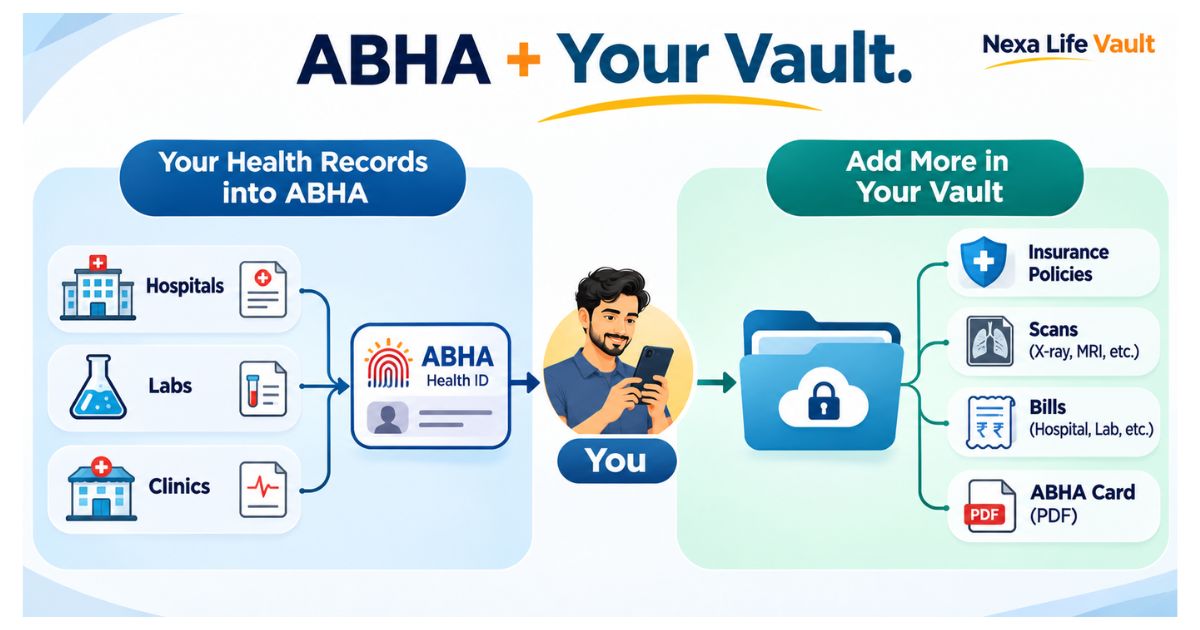
ABHA ID, short for Ayushman Bharat Health Account, is a 14-digit health ID for people in India, issued under the Ayushman Bharat Digital Mission. You can create it using your Aadhaar or a driving licence. Participating hospitals and labs can then link your health records to it, and you share them only with your consent.
You walk into a new clinic. The doctor asks which tablet you took last year and what your last blood test showed. Your reports are in a drawer, a lab's email and a WhatsApp chat. The ABHA ID was built to reduce that scramble. This article explains what it is, how to create it, how to link your records, and where a private vault still helps.
What is an ABHA ID?
The ABHA ID is a unique 14-digit number that identifies you in India's digital health system. It was formerly called the Health ID. The system is run under the Ayushman Bharat Digital Mission (ABDM) by the National Health Authority.
Think of it as a login for your health data. A hospital that is part of the ABDM network can attach a discharge summary or lab report to your ABHA number. You can then see that record in your ABHA account.
The ABHA ID does not hold your medical history by itself. It is the key that connects records across different doctors, hospitals and labs.
ABHA number, ABHA address and ABHA card: what is the difference?
People often mix up these three terms. They are related, but they are not the same thing.
| Term | What it is | How you use it |
|---|---|---|
| ABHA number | The 14-digit health ID | Identifies you at ABDM-enabled hospitals and labs |
| ABHA address | A username you choose, similar to an email ID | Easier to remember and share than the long number; also used to log in |
| ABHA card | A downloadable card showing your details and ABHA number | Show it or share the number when you register at a health facility |
Verify with the official source (the ABDM website, abdm.gov.in) before acting, as names and features can change.
What are the ABHA health ID benefits?
The main benefit is simple: one ID that follows you from clinic to clinic. Here is what that can mean in daily life.
- Less paperwork. A facility on the network can add your reports to your account, so you do not depend only on paper files.
- You control sharing. Records are shared after you give consent. You decide which facility or doctor sees what.
- A cleaner history for new doctors. If a new specialist can see your past prescriptions and reports, the first visit can be faster.
- Easier lookup of providers. The ABDM ecosystem includes registries of doctors and health facilities that you can search.
- Possible links to government health programmes. Some schemes may ask for an ABHA. Check the scheme's own rules to see whether it applies to you.
One caution. These benefits depend on the hospital or lab being part of the ABDM network. If your family doctor has not joined, nothing flows into your ABHA account from that clinic.
How do you create an ABHA card?
You can create an ABHA number on the official portal (abha.abdm.gov.in) or through the ABHA mobile app. You can also create one at an ABDM-registered health facility. The exact screens change from time to time, so follow what you see on the official site. The usual flow looks like this:
- Open abha.abdm.gov.in or the ABHA app and choose Create ABHA Number.
- Pick your verification method. The common options are your Aadhaar number or your driving licence.
- If you use Aadhaar, enter the number and agree to the consent terms. An OTP goes to the mobile number linked with your Aadhaar.
- Enter the OTP and confirm your details, such as name and date of birth.
- Add a mobile number you actively use, so you can log in and receive alerts.
- Your 14-digit ABHA number is generated.
- Create your ABHA address (your chosen username) and set a password.
- Download your ABHA card as a PDF and save it somewhere you can find it.
Common mistake: using a mobile number that is not linked to Aadhaar for the Aadhaar OTP step. The OTP goes only to the Aadhaar-linked number. If that number is old or lost, you may need the driving licence route, or help at a registered facility. The ABDM helpline listed on its official material is 14477, but confirm it on abdm.gov.in.
How do you link your health records to your ABHA?
Creating the ABHA ID is only step one. Records appear only when a health facility links them to you. In most cases the process works like this:
- Visit a hospital, clinic or lab that is ABDM-enabled. You can search for one on the ABDM facility registry.
- Tell the front desk you want your visit linked to your ABHA. Share your ABHA number or ABHA address.
- Approve the consent request. You may get it as an OTP or a notification in the ABHA app.
- After the consultation or test, the facility uploads the record to your ABHA.
- Log in to the ABHA app or portal and open your linked records to view them.
You can also use the link or discover feature in the ABHA app to search for a facility where you already have records. Whether it works depends on whether that facility has enabled the service.
Pro tip: Ask for your ABHA to be linked at the start of each visit, not the end. Once billing is done, front-desk staff often cannot go back and attach the record. Say it while you register.
Does ABHA store everything? What it can and cannot do
This is where many people get surprised. ABHA is a national health identity and record-sharing system. It is not a place where you drop every health paper you own.
Take Meera, who looks after her father's health papers. His heart surgery record from a hospital on the network shows up in his ABHA account. But his health insurance policy PDF, the paper bills from a clinic that has not joined, and the old X-ray films scanned from 2015 do not. They stay scattered unless she stores them somewhere herself.
ABHA vs a private vault: how do they fit together?
They do different jobs, so they work best side by side. For more on why digitising records matters in general, read our post on the benefits of digital health records.
| ABHA (ABDM) | A private vault | |
|---|---|---|
| Main purpose | National health ID and record sharing between providers | Your own organised storage for any document you choose |
| Who adds records | Participating hospitals and labs, after your consent | You do |
| What it can hold | Records created by ABDM-enabled facilities | Scanned reports, insurance policies, bills, vaccination papers, ABHA card PDF |
| Family view | Each person has their own ABHA | You can organise papers for parents, children and yourself in one place |
A simple way to think about it: ABHA is the official channel through which hospitals send records to you. A vault is your own filing cabinet for everything else, including the ABHA card itself.
Is it safe to link your records? A few sensible habits
ABHA works on consent, so a facility should ask before it links or views your records. Read each consent request before you approve it. Do not share your OTP with anyone who calls or messages you, even if they say they are from a hospital.
Use a strong password for your ABHA account. Keep your mobile number up to date so OTPs reach you. Log out on shared computers. Read the privacy and consent terms on the official site, as they are the final word on how your data is handled.
How Nexa Life Vault helps
ABHA brings records from participating hospitals. Everything else still needs a home: the scanned prescription, the health insurance policy, the vaccination card, the bill you need for a claim.
The Health Vault in Nexa Life Vault gives you one place for those papers. You can keep your ABHA card PDF there too, so you never hunt for your ID number at a hospital counter. With Smart Document Alerts, you can set expiry and renewal reminders, for example for a health insurance policy, so a renewal date does not slip by.
Files are protected with AES-256-GCM encryption and per-file keys. Nexa Life Vault is a separate service from ABHA and works alongside it. Keep using ABHA for hospital-linked records, and use your vault for the rest.
Conclusion
An ABHA ID is a useful first step toward digital health records in India, but it only covers what participating facilities send to you. Create yours, ask for it to be linked at every visit, and keep your own copies of everything else. Keep all your health records organised in the Nexa Life Vault Health Vault, with your ABHA card saved alongside them.
This is general information, not legal, tax or financial advice. Verify with the official source (ABDM, abdm.gov.in, and the ABHA portal, abha.abdm.gov.in) before acting.
Frequently Asked Questions
Shailesh Nagar
Cloud Infrastructure & Security Contributor
Technology specialist at NexaLifeVault focusing on cloud infrastructure, data resilience protocols, and modern digital asset management.
Share this post
Comments (0)
No comments yet. Be the first to comment!