How to Add a Nominee in Bank Account, EPF, Mutual Funds and Insurance
Learn how to add a nominee online for your bank account, EPF, mutual funds and insurance, with forms, steps and a quick where-to-go table.
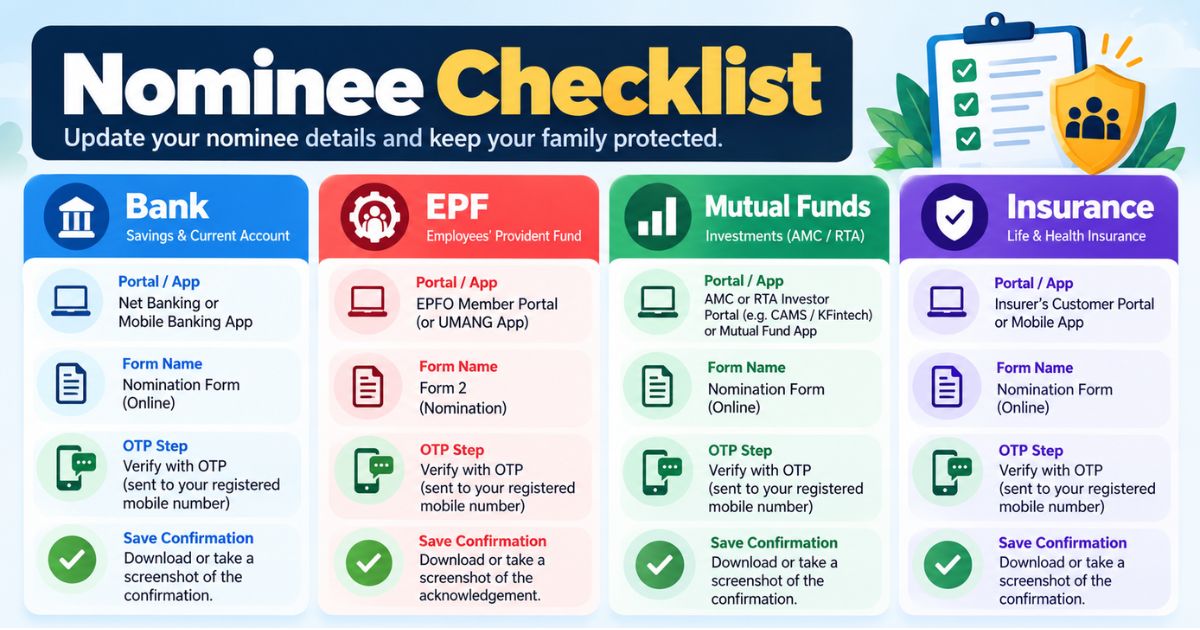
To add a nominee online, log in to each provider separately. For a bank account, use net banking or the app. For EPF, use the EPFO member portal's e-Nomination. For mutual funds, use the fund house, RTA or MF Central. For insurance, use the insurer's portal. Keep the confirmation for each.
Think of a family where one parent held a savings account, an EPF balance, a few mutual fund folios and two insurance policies. Only the insurance had a nominee on record. Everything else needed extra paperwork and weeks of waiting. Learning how to add nominee online takes one afternoon, and it can spare your family that delay. This guide covers all four, with forms, steps and mistakes to avoid.
This is general information, not legal, tax or financial advice.
Why does adding a nominee matter?
A nominee is the person your bank, EPFO, fund house or insurer will deal with first if you pass away. Without one, your family usually has to prove its right through legal heir documents, which takes longer and needs more paperwork.
Nomination is also not a one-time job. Each account, folio, policy and EPF membership keeps its own nominee record. Updating one does not update the others.
How to add nominee online: where, which form, online or offline?
This table shows where each nomination is made, the form involved and whether you can do it online. Exact options differ by bank, fund house and insurer, so treat the last column as a guide.
| Asset | Where you do it | Form or process | Online or offline |
|---|---|---|---|
| Bank account (savings, FD, RD) | Net banking, mobile app or home branch | Nomination form DA-1; DA-2 to change or cancel | Online at most large banks; branch visit otherwise |
| EPF | EPFO Unified Member Portal | e-Nomination (the older paper version is Form 2) | Online, using Aadhaar OTP |
| Mutual funds | AMC website or app, RTA portal (CAMS, KFintech), MF Central, or your demat provider | Nomination form or online nomination, per folio | Mostly online; paper form is accepted |
| Life or health insurance | Insurer's portal, app, branch or customer care | Nomination change request, confirmed by an endorsement | Online at most insurers; some need a signed form |
Verify with the official source (your bank, EPFO, the fund house or SEBI, and your insurer or IRDAI) before acting.
What do you need before you start?
Keep these ready so you do not stop halfway:
- Your Aadhaar and PAN, and a mobile number that receives OTPs.
- Each nominee's full name as on their Aadhaar, date of birth, address and relationship to you.
- Your account numbers, folio numbers and policy numbers.
- For a nominee under 18, the name and details of an adult who will act for them.
- For EPF, an active UAN with Aadhaar verified and a mobile number linked to it.
How do you add a nominee in a bank account?
Adding a nominee in a bank account is usually the quickest of the four. Most large banks let you do it from net banking or the app. The menu name varies, so look under "Service Requests", "Nomination" or "Update Profile".
- Log in to net banking or the mobile app.
- Open the nomination option and choose the account. Savings accounts, fixed deposits and recurring deposits are often handled one by one.
- Enter the nominee's name, relationship, date of birth and address. For a minor nominee, add the guardian's details.
- Confirm with an OTP. Some banks ask for an Aadhaar-based e-sign.
- Save the acknowledgement or reference number.
If your bank does not offer this online, visit the branch and fill in the nomination form (DA-1). To change or cancel an existing nominee, the form is DA-2. If you hold a locker or safe custody items, ask the branch about nomination for those separately.
Verify with the official source (your bank, and the Reserve Bank of India's guidelines) before acting, because banking nomination rules have been updated recently.
How do you do EPF nominee online?
You can complete an EPF nominee online through the EPFO Unified Member Portal. The process is called e-Nomination, and it replaces the paper Form 2 for most members.
- Check that your UAN is active, your Aadhaar is verified and your Aadhaar-linked mobile number works.
- Log in to the EPFO Unified Member Portal with your UAN, password and captcha.
- Open the "Manage" menu and select "E-Nomination".
- Confirm your details, then choose "Add Family Details".
- Add each nominee with name, relationship, date of birth, Aadhaar, address and photo. If you add more than one, set each share so the total is 100%.
- Select "Save EPF Nomination", then "e-Sign" with the OTP sent to your Aadhaar-linked mobile.
If you change jobs, check that your e-Nomination still shows on the portal. A new employer or a new UAN is a good moment to confirm it. Verify with the official source (the EPFO member portal) before acting, since menu names and requirements can change.
How do you add a mutual fund nominee?
A mutual fund nominee is set for each folio, not once for all your funds. If you hold units with three fund houses, that means three nominations. Units held in a demat account are nominated through your demat provider instead.
- Choose where to do it: the fund house (AMC) website or app, the RTA portal (CAMS or KFintech), MF Central, or the platform where you invest.
- Log in and find the nomination option for the folio.
- Enter the nominee's name, relationship, date of birth and address. Add a guardian for a minor.
- Set each nominee's share if you have more than one.
- Authenticate with an OTP or e-sign. Joint holders may all need to approve.
- Download the confirmation.
SEBI's rules ask investors to either nominate or formally opt out. Opting out is possible, but it is rarely the better choice for your family. Verify with the official source (SEBI circulars and your fund house) before acting.
How do you do an insurance nominee change?
An insurance nominee change is made with your insurer, and the insurer confirms it by issuing an endorsement. Do this for each policy, including term, health and endowment plans.
- Log in to the insurer's customer portal or app. If you bought through an agent or an aggregator, you still deal with the insurer for changes.
- Open "Policy Services" or a similar menu and choose "Change Nominee".
- Enter the new nominee's name, relationship, date of birth and share. For a minor, name an appointee.
- Authenticate with an OTP or upload a signed form, depending on the insurer.
- Wait for the endorsement and save it with the policy document.
Some policies, such as those issued under the Married Women's Property Act, follow special rules about who can benefit and whether a nominee can be changed. If your policy has this, ask the insurer before changing anything.
Verify with the official source (your insurer, and IRDAI guidelines) before acting.
Is a nominee the owner of the money?
Not always. A nominee is the person who receives the money or units first and gives a valid discharge to the institution. Whether they can keep it, or must share it with other legal heirs, depends on succession law and any will you have made. The position can differ by asset type.
This is why a nomination works best alongside a will. The nominee handles the claim quickly, and the will says who ultimately inherits. For legal advice on your family's situation, speak to a lawyer.
What should you check after adding nominees?
Run through this short list once you finish:
- Names and spellings match Aadhaar or PAN exactly.
- Shares add up to 100% wherever you have more than one nominee.
- Every minor nominee has a guardian or appointee named.
- You have saved the confirmation for each update, not only the last one.
- The people you nominated know where these records are.
For more on keeping investment papers in order, read our guide on investment records management. If you are planning ahead for retirement, see the retirement documents you need.
How Nexa Life Vault helps
The hard part of nomination is not the form. It is finding the proof later. Your bank acknowledgement, EPF e-Nomination, mutual fund confirmations and insurance endorsements end up in different inboxes and folders.
The Finance Vault gives you one place to store these records, so you can find them when you need them. With Nominee & Executor Access, you can decide who in your family can reach these documents when the time comes.
This does not replace the nomination you register with your bank, EPFO, fund house or insurer. It keeps your copies organised. Nexa Life Vault does not promise that a digital copy will be accepted as legally valid, so ask the institution what it requires.
Conclusion
Knowing how to add nominee online is only half the job. The other half is doing it for every account, folio, policy and EPF record, then keeping the proof in one place. Pick one asset today and finish it before you log out. When you are done, store the confirmations in your Finance Vault on Nexa Life Vault.
Frequently Asked Questions
Shailesh Nagar
Cloud Infrastructure & Security Contributor
Technology specialist at NexaLifeVault focusing on cloud infrastructure, data resilience protocols, and modern digital asset management.
Share this post
Comments (0)
No comments yet. Be the first to comment!