Right to Work Checks UK: Documents Employees Need and Employers Must Keep
Learn which right to work documents UK employees can show, how share codes work, and what employers must copy, date and keep for two years after employment ends.
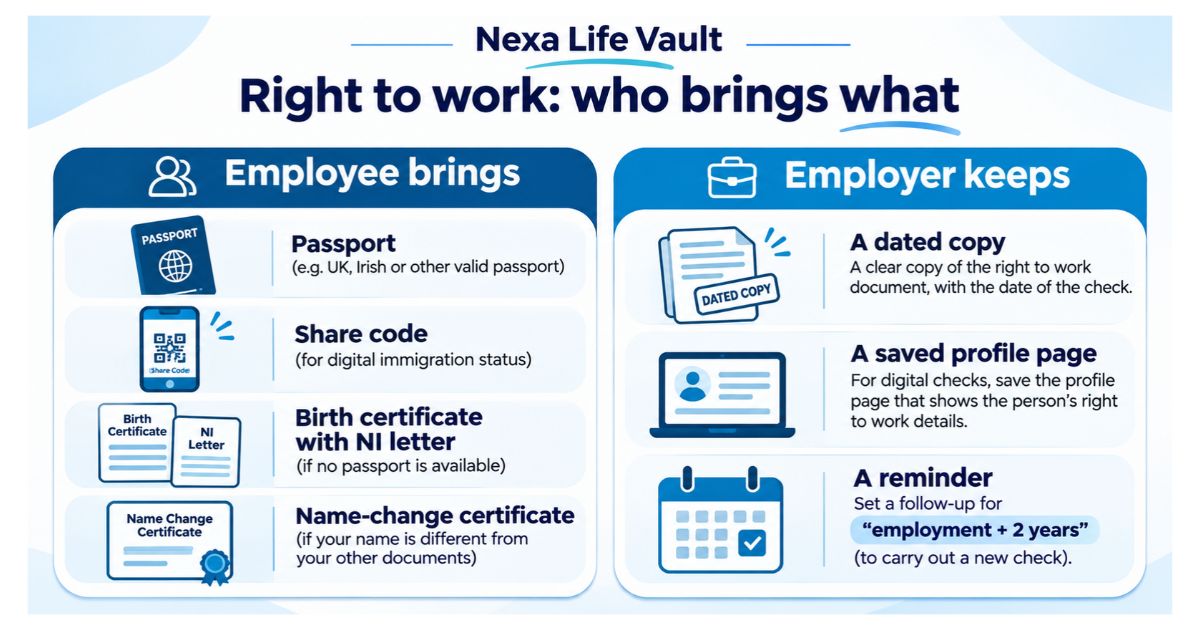
UK employers must check a worker’s right to work before they start. Employees can show certain original documents, such as a British or Irish passport, or give a Home Office share code if they have an eVisa. Employers must copy the evidence, record the check date, and keep it for the length of employment plus two years.
A start date can slip because one document is missing. Employees often do not know which right to work documents UK employers will accept. Employers often forget what to copy, how to date it and how long to keep it. This guide covers both sides, based on the Home Office employer guidance dated 1 October 2026.
This is general information, not legal, tax or financial advice. Verify with the official source (GOV.UK, “Right to work checks: an employer’s guide”) before acting.
What is a right to work check?
A right to work check is a step an employer takes before someone starts work. It confirms the person is allowed to do that job under their immigration status. If the employer does the check the way the Home Office prescribes, they gain a “statutory excuse”. That is protection from a civil penalty if the worker later turns out to be working illegally.
There are three ways to do the check:
- A manual check of original documents.
- A Home Office online check using the worker’s share code.
- A check through a registered digital identity provider (the guidance calls these RtW DVSPs).
An employer cannot force one method on you. Workers must get a reasonable chance to use a method that is open to them.
The scheme is wider than it used to be. The 2026 guidance also covers people engaged under worker’s contracts, individual sub-contractors and online matching services. For those routes, a penalty only applies where the work began on or after 1 October 2026. If you run a platform or use supply chains, read the extended liability section of the guide.
Which right to work documents UK employers can accept?
The right route depends on the worker’s status. This table gives a plain-English summary of the main cases.
| Employee’s situation | What they show | Type of check | Follow-up check needed? |
|---|---|---|---|
| British citizen | British passport (current or expired), or a UK birth or adoption certificate plus an official document showing their National Insurance number and name | Manual (a passport can also go through a registered digital provider) | No |
| Irish citizen | Irish passport or passport card (current or expired) | Manual or registered digital provider | No |
| Holds an eVisa | Share code plus date of birth | Home Office online check | Yes if permission has an end date. No for settled or EU Settlement Scheme status |
| Settled, with an older physical Home Office document | Current Immigration Status Document showing indefinite stay, plus an official National Insurance document | Manual | No |
| British citizen by registration or naturalisation | Certificate of registration or naturalisation, plus an official National Insurance document | Manual | No |
| Time-limited permission, physical documents | For example, a current passport endorsed to show they may stay and do the work in question | Manual | Yes, on or before the expiry date |
| Outstanding application or appeal, or no share code available | Employer asks the Home Office Employer Checking Service for a Positive Verification Notice | Employer Checking Service | Yes, the excuse lasts six months |
Two things are not accepted. A clipped passport (corners cut off) is cancelled, so it does not count. An expired physical Biometric Residence Permit does not count either, and the employer must use the online check instead.
Where a National Insurance number is needed, an “official document” means one from a government agency or a previous employer, such as an HMRC letter, P45 or P60. Employers can accept digital evidence of a name and National Insurance number if it clearly comes from a reliable source.
How does a right to work share code work?
A right to work share code is how someone with an eVisa lets an employer see their status. It has nine characters and starts with the letter W. The worker signs in to their Home Office account and chooses “Prove your right to work to an employer: get a share code”. They then give the code to the employer along with their date of birth.
Codes starting with R or S are for other services and cannot be used. A work code stays valid for 90 calendar days and can be reused in that time for the same purpose. If it has expired, ask for a new one.
Here is what the employer does:
- Open the GOV.UK service “Check a job applicant’s right to work: use their share code”.
- Enter the share code and the worker’s date of birth.
- Enter your business name correctly and in full.
- Compare the photo on the result with the person, in person or on a video call.
- Confirm the result says they can do the job offered, and note any restrictions.
- Save a PDF or HTML copy of the profile page, showing the photo and the date of the check.
Looking at the worker’s own screen or a printout of what they see is not enough. The employer has to run the check themselves.
Take Amara, who has an eVisa and starts on Monday. On Thursday she generates a code on her phone and emails it to the hiring manager. The manager runs the check on GOV.UK that day, matches the photo on a short video call and saves the profile page as a PDF. The start date holds.
What should employees have ready?
You do not need a folder of papers. You need the right one or two items for your situation.
- British or Irish passport: the original, not a photo. It must not be clipped or cancelled.
- eVisa: a fresh share code and your date of birth. Create it close to your start date.
- Birth or adoption certificate route: the original certificate plus an official document showing your National Insurance number.
- Different names across documents: evidence such as a marriage certificate, decree absolute or deed poll.
- Students with limited work rights: your term and vacation dates, because the employer must keep them.
If you cannot use the method an employer suggests, say so. They must give you another way to prove your right to work.
What must employers check, copy and record?
For a manual check, the Home Office sets out four steps. All of them must be finished before the person starts.
- Obtain: get the original documents from the approved lists.
- Check: make sure the documents look genuine, are untampered and belong to the person. Check photos and dates of birth match, expiry dates have not passed, and any work restrictions fit the job. Do this with the holder present, in person or by live video link while you hold the originals.
- Copy: make a clear copy of each document in a form that is hard to alter, such as a PDF. For a passport, copy every page showing the expiry date, nationality, date of birth, signature, immigration permission, biometric details and photo. The front cover is not needed.
- Record and retain: record the date of the check and keep the copies securely.
Records must be kept for the whole time the person works for you and for two years afterwards. Then they must be securely destroyed. Be ready to produce them quickly if the Home Office asks.
| Check type | What to keep | How long |
|---|---|---|
| Manual document check | Clear copies of each document, a dated record of the check, and any supporting name-change documents | Employment plus two years |
| Home Office online check | PDF or HTML copy of the profile page with the photo and check date | Employment plus two years |
| Registered digital provider | The provider’s full output, plus any facial comparison it supplied | Employment plus two years |
Common mistake: writing a date on a photocopy and stopping there. The guidance says a date alone is not enough. Add the wording “The date on which this right to work check was made: [insert date]”, or keep a separate record. Another frequent slip is accepting a WhatsApp photo of a passport for a manual check. That does not count.
Small firms often keep these files next to other company paperwork, for example in a Business Vault. For wider HR file rules, see our employee records retention checklist.
When do employers need follow-up checks?
If a worker’s permission has an end date, the employer must check again on or before that date to keep the statutory excuse. The second check does not have to use the same method as the first.
No follow-up is needed for workers who showed a British or Irish passport, or who have settled or EU Settlement Scheme status. If a worker cannot prove continued permission, do not assume the worst. They may have an in-time application pending, or there may be a technical fault with their share code. Give them a reasonable chance to sort it out. The Employer Checking Service can help where an online check will not work.
Check everyone the same way, including British citizens. Do not guess someone’s status from their accent, surname or how long they have lived here.
How Nexa Life Vault helps
Job Vault gives you one place for the employment proofs behind these checks: offer letters, contracts, National Insurance evidence, name-change certificates and notes about your permission dates. Smart Document Alerts can remind you before an expiry date, so a follow-up check does not catch you or your employer by surprise.
Files are protected with AES-256-GCM encryption, each with its own key. Your eVisa itself stays in your Home Office account, so use the vault for supporting papers and your own reminders. A stored copy does not replace the Home Office steps. Employers must still carry out the check as prescribed.
Conclusion
Right to work documents UK checks go smoothly when both sides prepare. Employees should know which route applies and have an original passport or a fresh share code ready. Employers should check, copy, date and keep the record for employment plus two years, then diarise every expiry date. Keep employment proofs ready in Job Vault, and let Smart Document Alerts remind you before anything runs out.
Frequently Asked Questions
Pratyush Kumar
Technology Lead & Digital Transformation Strategist
Technology leader and digital transformation strategist writing about secure enterprise data architecture, privacy-first engineering, and next-generation vault solutions.
Share this post
Comments (0)
No comments yet. Be the first to comment!