Udyam (MSME) Registration: Documents Needed and How to Store Your Certificate
Udyam registration documents are mostly details you enter, not files you upload. Learn what you need, how to download your MSME certificate, and how to store it safely.
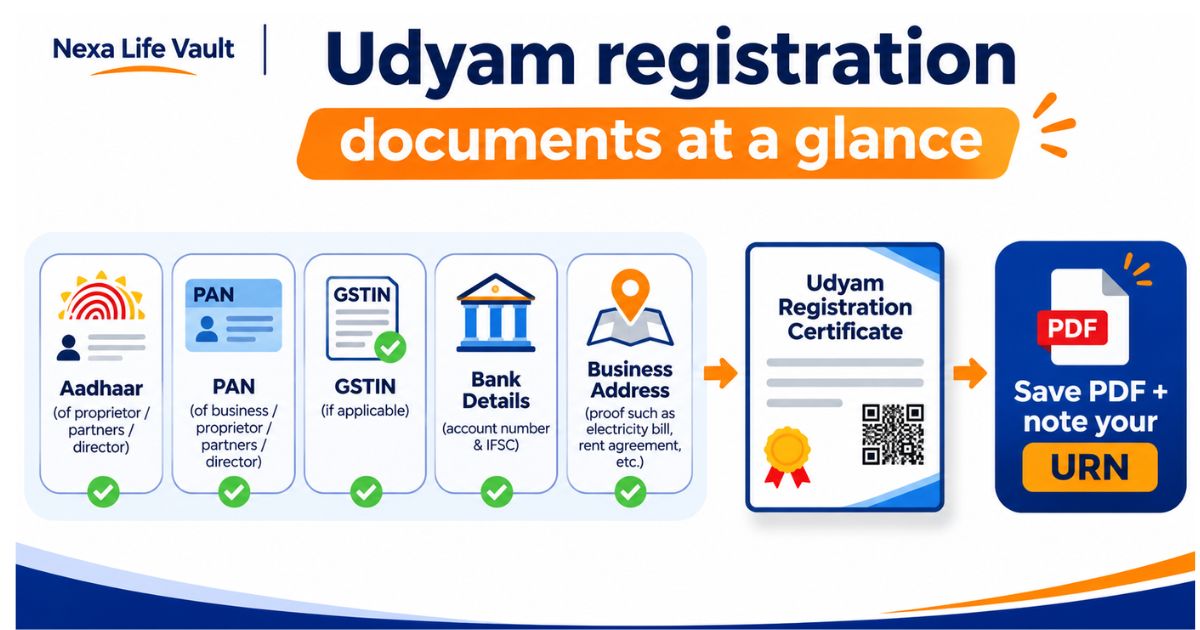
For Udyam registration, you mainly need the Aadhaar number of the owner or authorised signatory, your PAN, your GSTIN (if applicable), and your bank account details. The portal works on self-declaration, so you typically do not upload documents. It pulls PAN and GST data from government records. Registration is done on the official Udyam portal.
Most new business owners expect a long list of paperwork for MSME registration. The Udyam process is lighter than that, but you still need the right details ready before you start. A wrong digit or a mismatched name can stall the application.
This guide lists the Udyam registration documents and details you need, explains how to download your certificate, and shows what to do if it goes missing.
What Udyam registration documents and details do you need?
Udyam registration is the government's system for registering micro, small and medium enterprises (MSMEs). Keep these items ready before you open the portal:
- Aadhaar number of the proprietor, the managing partner, the karta, or the authorised signatory (for a company or LLP). The mobile number linked to this Aadhaar receives the OTP.
- PAN of the business. For a proprietorship, this is usually the owner's PAN.
- GSTIN, if your business is registered under GST.
- Business name and type (proprietorship, partnership, LLP, private limited company and so on), exactly as in your PAN records.
- Business address of the office, plant or unit, with PIN code.
- Bank account details: account number and IFSC code.
- Date of starting the business, or the incorporation date for a registered entity.
- NIC activity code for what your business does (manufacturing or services).
- Number of employees and investment and turnover details, as the form asks.
- Active email ID and mobile number.
Everything above is a detail you enter, not a file you attach. That is why people searching for "udyam registration documents" are often surprised by the answer.
Do you need to upload any documents for Udyam registration?
Generally, no. The registration is based on self-declaration. The portal validates your PAN and GST details against government databases. If you enter a name or number that does not match those records, the form may reject it.
The rules on what is mandatory can change. PAN and GST requirements, in particular, have been updated over the years, and some categories of businesses are treated differently. Verify with the official source (the Udyam Registration portal and the Ministry of MSME website) before acting.
How do you register on the Udyam portal, step by step?
- Go to the official Udyam Registration portal, which is a government website. Do not use agents who charge a fee for something the portal offers free of cost.
- Choose "New Entrepreneurs who are not Registered yet as MSME" or the option that fits your case.
- Enter the Aadhaar number and name of the owner or authorised signatory. Request the OTP and verify it.
- Select your organisation type and enter your PAN. The portal validates it.
- Enter your GSTIN if you have one, then fill in the business name, address, bank details, activity code and employee details.
- Review every field, submit, and complete the final OTP check.
- Note your Udyam Registration Number (URN) and download the certificate.
Set aside 20 to 30 minutes with your PAN, Aadhaar-linked phone and bank details beside you. Rushing through the form is where most errors happen.
A quick example
Meera is starting a home bakery in Ahmedabad. She is a sole proprietor, so she registers with her own Aadhaar and PAN. She has no GST registration yet, so she leaves that field as the form allows. She keeps her bank passbook handy for the IFSC code. She finishes in one sitting and downloads the certificate straight away.
What are the benefits of Udyam registration?
The benefits of Udyam registration depend on your business and the schemes in force at the time. Commonly cited advantages include:
- Easier access to bank credit. Banks often ask for MSME proof when you apply for business loans or schemes meant for small enterprises.
- Government scheme eligibility. Many central and state schemes, subsidies and support programmes are open only to registered MSMEs.
- Tender and procurement relaxations. Some government purchase processes offer relaxations to registered MSMEs.
- Protection on delayed payments. The MSME law has provisions on timely payment by buyers, which registered units may use.
- A recognised identity. Your URN works as a single reference for your enterprise on the portal.
Specific benefits, limits and conditions change with policy. Check the current scheme guidelines on the Ministry of MSME website before you plan around any one of them.
Which details should match across your business records?
The Udyam portal checks your entries against other records. Mismatches are a common reason for delays.
| Detail | Where it comes from | Why it matters |
|---|---|---|
| Name of owner or signatory | Aadhaar | OTP and identity check |
| Business or entity name | PAN records | PAN validation |
| GSTIN and trade name | GST registration | Data is fetched from GST records |
| Bank account and IFSC | Passbook or cheque book | Required in the form |
| Business address | Rent agreement or utility bill (for your own reference) | Should match your other records |
How do you download your MSME certificate?
An MSME certificate download is usually possible right after registration is complete. The portal shows a certificate with your Udyam Registration Number and a QR code. You can save it as a PDF.
If you registered earlier and need it again:
- Open the official Udyam portal and look for the option to print or verify your Udyam certificate.
- Enter your Udyam Registration Number and the details the page asks for.
- Verify with the OTP sent to your registered mobile number or email.
- Download the certificate as a PDF.
Menu names and steps on government portals change from time to time. Verify with the official source (the Udyam Registration portal) before acting.
What should you do if your Udyam certificate is lost?
If your Udyam certificate is lost, you do not need to register again. Your registration stays on the portal, and you can usually download a fresh copy of the certificate.
- If you remember your URN, use the print or verify option on the portal and download the certificate again.
- If you forgot your URN, check old emails and SMS messages sent when you registered. Search for "Udyam". Your bank or loan file may also carry the number.
- If you cannot retrieve it, the portal's help and grievance options, or your District Industries Centre, can guide you. Confirm the current contact route on the official site.
Avoid paying anyone who offers to "recover" the certificate. The download is meant to be free of cost on the official portal.
Common mistake: Saving the certificate only in your email downloads folder or on one phone. When the phone is replaced or the mailbox is full, you may lose both the PDF and the URN. Save the URN separately as a note, and keep the PDF in a place you can search by name.
How should you store your Udyam certificate?
You will be asked for the certificate more often than you expect: bank loan applications, vendor onboarding, tender forms and subsidy claims. A good storage habit saves you from last-minute hunting.
- Keep a clean PDF copy with a clear name, such as "Udyam-Certificate-BusinessName".
- Note the URN in a second place, such as your business records or password manager.
- Store it with your other business papers (GST certificate, PAN, shop licence, incorporation documents). If you need a full list of those, read our guide on business documents every company needs.
- Keep a printed copy for places that still ask for paper.
- Re-download after any update to your Udyam details and replace the old file.
This general information is not legal, tax or financial advice. Banks, departments and tender authorities set their own document rules, so check what each one accepts.
How Nexa Life Vault helps
The Business Vault is built for papers like your Udyam certificate, GST registration, PAN copy, licences and contracts. You keep them in one place instead of across email, WhatsApp and phone galleries.
With Smart Document Alerts, you can set reminders for documents that have renewal or expiry dates, such as licences and agreements stored beside your Udyam certificate. AI-powered search helps you find a file by name when a bank officer asks for it.
Files are protected with AES-256-GCM encryption and per-file keys. Files are decrypted only in server memory for authorised requests. Check with the receiving bank or authority whether they accept a digital copy of your certificate.
Conclusion
Udyam registration documents are mostly details you already have: Aadhaar, PAN, GSTIN and bank information. The hard part is not the form but keeping the certificate and URN where you can find them years later. Download it, back it up, and file it with your other business papers. Ready to organise your paperwork? Store business certificates in your Nexa Life Vault Business Vault today.
Frequently Asked Questions
Shailesh Nagar
Cloud Infrastructure & Security Contributor
Technology specialist at NexaLifeVault focusing on cloud infrastructure, data resilience protocols, and modern digital asset management.
Share this post
Comments (0)
No comments yet. Be the first to comment!