Form 16 vs Form 26AS vs AIS: What They Are and How Long to Keep Each
Form 16, Form 26AS and AIS each show a different side of your income and tax. Learn what each one covers, how to download them and how long to keep them after you file your ITR.
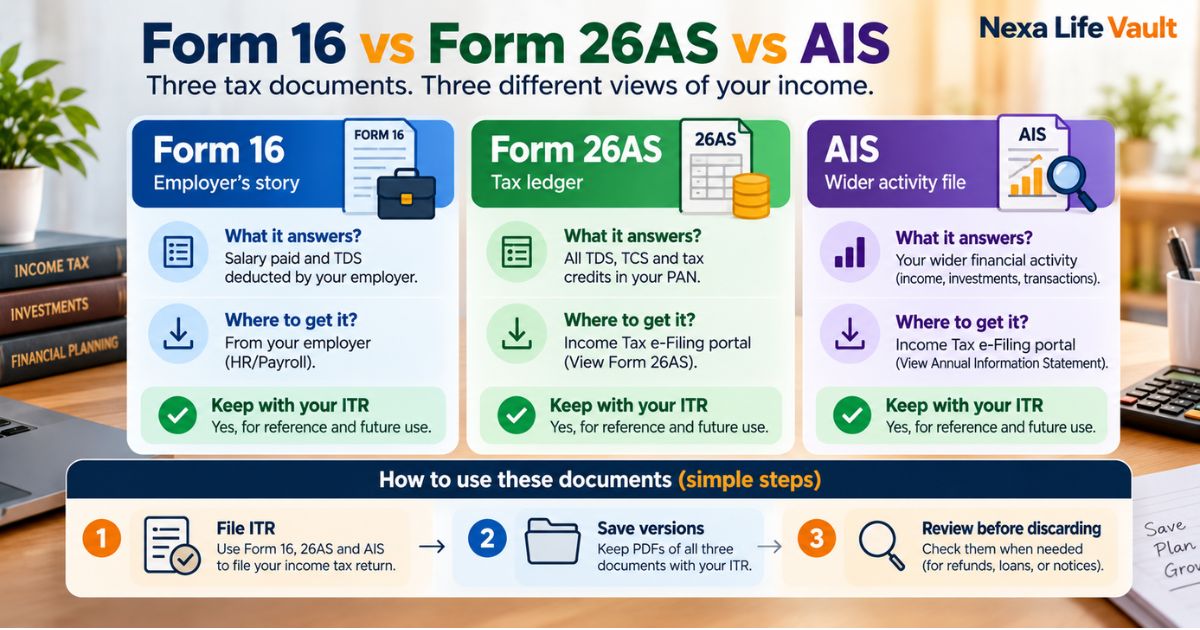
Form 16 vs Form 26AS vs AIS in one line: Form 16 is your employer's salary and TDS certificate. Form 26AS is a government record of tax already deducted or paid in your name. AIS is a wider statement that also lists interest, dividends and investment transactions. Keep all three with your filed ITR for several years.
You file your return, get the acknowledgement, and move on. Then a notice arrives two years later asking why your interest income looks lower than what the bank reported. At that point, you need the right paper in the right place. This article explains what each of these three documents does, where to get it, and how long it earns a spot in your records.
This is general information, not legal, tax or financial advice. Tax rules and portal screens change. Verify with the official source (the Income Tax Department e-filing portal at incometax.gov.in) before acting.
Form 16 vs Form 26AS vs AIS: what is the difference?
The three documents answer different questions. Form 16 tells you what your employer says about your salary and tax. Form 26AS shows what tax the government has on record in your name. AIS shows a much broader picture of your financial activity as reported by banks, companies and other institutions.
| Document | Who produces it | What it shows | Where you get it | How long to keep it |
|---|---|---|---|---|
| Form 16 | Your employer | Salary paid, tax deducted at source (TDS) and deductions your employer accounted for | From your employer, usually by email or the HR portal | Keep with each year's ITR for several years; many people keep it permanently |
| Form 26AS | Income Tax Department | TDS and TCS credited to your PAN, advance tax and self-assessment tax paid, and refunds | Your e-filing account on the income tax portal (via TRACES) | Keep the version you used to file, for the same period as your ITR |
| AIS | Income Tax Department | Salary, interest, dividends, securities and mutual fund transactions, and more, as reported by third parties | Your e-filing account on the income tax portal | Keep the version you used to file, for the same period as your ITR |
Think of it this way. Form 16 is your employer's story. Form 26AS is the tax ledger. AIS is the wider information file the department holds about you.
What is Form 16?
Form 16 is a certificate your employer gives you after the financial year ends. It confirms how much tax was deducted from your salary and deposited with the government.
It has two parts. Part A summarises the TDS deducted and deposited, along with your employer's TAN and your PAN. Part B breaks down your salary, allowances and the deductions your employer considered.
If you changed jobs during the year, you should get a separate Form 16 from each employer. Ask for both. A common slip is filing with only the latest one and leaving out the first employer's salary.
Form 16 only covers salary. It says nothing about your savings account interest, a fixed deposit, rent from a flat or gains from shares.
What is Form 26AS?
Form 26AS is your annual tax statement. It lists the tax linked to your PAN: TDS deducted by anyone who paid you, tax collected at source (TCS), advance tax and self-assessment tax you paid yourself, and refunds issued to you.
Its main job is simple. It lets you check that tax deducted from your income actually reached your account with the department. If your employer deducted tax but never deposited it, the credit will not show up here, and you would want to raise it before filing.
How do you do a Form 26AS download?
The steps below are the usual route. Screens and menu names can change, so check the portal itself.
- Log in to your account on the income tax e-filing portal with your PAN.
- Find the option to view your annual tax statement (Form 26AS) under the e-File or Services menu.
- Accept the redirect to TRACES, the tax credit system.
- Choose the assessment year and the format you want.
- Download the file and save it with a clear name, such as "Form26AS_AY-2025-26_[your name]".
Verify with the official source (the Income Tax Department e-filing portal and TRACES) before acting, because the process may change.
What is AIS?
If you are searching "what is AIS", here is the short answer. AIS stands for Annual Information Statement. It is a detailed statement of the financial information that banks, companies, registrars and other bodies have reported about you to the Income Tax Department.
Where Form 26AS is mostly about tax, AIS is mostly about activity. It can include interest from savings accounts and deposits, dividends, purchases and sales of securities and mutual fund units, and other reported transactions. It also includes the TDS and tax payments you would see in Form 26AS.
Alongside AIS, there is a shorter view called the Taxpayer Information Summary (TIS). It sums up the same information by category, which makes it easier to compare against your own records.
AIS also lets you give feedback. If an entry looks wrong, say a dividend reported twice or a transaction that is not yours, you can flag it on the portal. Keep a copy of the version you saw and the feedback you submitted.
Which of the three should you check before filing your ITR?
Use all three, in this order:
- Form 16: to cross-check your salary and employer TDS.
- Form 26AS: to confirm every rupee of TDS and advance tax is credited to your PAN.
- AIS and TIS: to catch income you may have forgotten, such as small interest from a dormant account or a dividend from an old holding.
A short example. Meera is a salaried employee with a savings account and a few mutual fund units. Her Form 16 shows salary only. Her Form 26AS shows TDS from her employer and a little from a bank deposit. Her AIS shows interest from a second bank account she barely uses. If she had filed from Form 16 alone, her return would have missed that interest, and the mismatch could have prompted a notice.
Common mistake: Downloading Form 26AS or AIS once and assuming it never changes. These statements are updated as institutions file their reports, so figures can shift after you first look. Check again close to filing, and save the exact version you filed with.
Which tax documents should you keep after filing your ITR?
The three statements above are the backbone, but they are not the whole file. Our income tax documents checklist covers the full list of proofs and receipts. For the three documents in this article, the practical set to keep is:
- Form 16 from every employer for that year.
- Form 26AS as it stood when you filed.
- AIS (and TIS) as it stood when you filed.
- The filed ITR and its acknowledgement (ITR-V or e-verification confirmation).
- Any notice, response or correction linked to that year.
Save everything for one assessment year together. Mixing years is how people lose the one page they need.
How long should you keep Form 16, Form 26AS and AIS?
The law does not give one neat answer for every person. How long the department can look back at a return depends on the type of case and the amounts involved, and those limits can change. So the safest approach is to keep documents until the period for reassessing that return has clearly closed and no query is open.
As a rule of thumb, many people keep income tax records for around six years after the relevant assessment year. Some keep them longer, especially when they involve property, capital gains or foreign income. Verify with the official source (the Income Tax Department and a qualified chartered accountant) before deciding to discard anything.
Here is a simple way to think about each document:
- Form 16: Keep it at least as long as the ITR it supports. It also helps when you apply for a loan or visa, so many people keep it for good.
- Form 26AS: Keep the downloaded copy for the same period as the ITR. It is your proof of what tax credit was on record when you filed.
- AIS: Same as Form 26AS. If you submitted feedback, keep that record until the matter is settled.
Documents tied to a property sale, an inherited asset or a long-term investment can matter for many years, because you may need them to calculate gains later. Our tax documents storage guide explains how to organise records by purpose and retention period.
Pro tip: Name each file with the assessment year first, for example "AY2025-26_Form16_EmployerName". When you sort by name, every year lines up in order and you can find a given year in seconds.
Why does this matter for family planning?
Tax records are not only for you. If something happens to you, your spouse or an executor may need to file a final return, claim a refund or answer a notice. Without a clear set of Form 16, Form 26AS and AIS copies, they start from zero and often have to guess which accounts and employers existed.
A short note listing where your records live, and who is allowed to see them, saves your family weeks of searching.
How Nexa Life Vault helps
Your Finance Vault is the natural home for your tax statements. You can store Form 16, Form 26AS, AIS, your filed ITR and its acknowledgement together, organised by year.
The feature most relevant here is Nominee & Executor Access. You can choose the people who should be able to reach these records if you are not able to share them yourself, so your family does not have to hunt through old emails and folders. Files are protected with AES-256-GCM encryption, with a separate key for each file.
Digital copies are a convenient way to keep your records. Always check with the Income Tax Department or your adviser about what a given authority will accept.
Conclusion
Form 16 vs Form 26AS vs AIS comes down to three questions: what did my employer report, what tax is credited to my PAN, and what income has everyone else reported about me? Keep all three with your filed return, year by year. Then keep your tax records in Finance Vault so they are easy to find when you or your family need them.
Frequently Asked Questions
Shailesh Nagar
Cloud Infrastructure & Security Contributor
Technology specialist at NexaLifeVault focusing on cloud infrastructure, data resilience protocols, and modern digital asset management.
Share this post
Comments (0)
No comments yet. Be the first to comment!