Cloud Storage Best Practices: Keep Your Files Safe Online
Learn cloud storage best practices to keep your files secure, organized, and accessible. Discover practical tips for protecting sensitive data, managing permissions, and preventing data loss.

Cloud storage has changed the way we store, access, and share information. From personal photos and important documents to business records and backups, cloud platforms make it easy to keep files available from almost anywhere.
While cloud storage offers convenience and flexibility, it also comes with security responsibilities. Without proper protection, sensitive information can be exposed through weak passwords, accidental sharing, or unauthorized access.
Understanding cloud storage best practices can help you protect valuable files, reduce security risks, and ensure your information remains accessible when you need it most.
In this guide, you'll learn how cloud storage works, common security risks to avoid, and practical strategies for keeping your files safe online.
Cloud storage security starts with proper account management. Keeping account credentials secure, enabling multi-factor authentication, and reviewing access regularly can help protect your files. Learn more in our guide on Online Account Management Tips for Better Security.
What Is Cloud Storage?
Cloud storage is a service that allows users to store files and data on remote servers instead of keeping everything on a local device. These files can be accessed through the internet using computers, smartphones, or tablets.
Many people use cloud storage for personal documents, photos, videos, backups, and file sharing. Businesses often rely on cloud platforms to store customer information, contracts, reports, and operational documents.
The biggest advantage of cloud storage is accessibility. Instead of being limited to a single device, files can be accessed from almost anywhere with an internet connection.
Benefits of Cloud Storage
Cloud storage has become popular because it offers several practical advantages for both individuals and businesses.
- Access files from multiple devices
- Reduce dependence on physical storage devices
- Simplify file sharing and collaboration
- Create backup copies of important information
- Improve document organization
- Support remote work and productivity
These benefits make cloud storage a valuable tool for managing digital information efficiently.
Why Cloud Storage Security Matters
Although cloud storage providers invest heavily in security, users still play an important role in protecting their data.
Files stored in the cloud may include financial records, personal information, legal documents, business contracts, medical records, and other sensitive data. If these files are exposed or lost, the consequences can be serious.
Common risks include:
- Weak account passwords
- Unauthorized access
- Accidental file sharing
- Phishing attacks
- Data breaches
- Deleted or overwritten files
Following proper security practices helps reduce these risks and improves overall data protection.
Cloud Storage and Digital Asset Protection
Many of the digital assets you use every day are stored in cloud-based systems. Personal documents, photos, financial records, business files, and account backups often depend on cloud storage for accessibility and protection.
Understanding which files require the highest level of protection is an important part of cloud security. Learn more in our guide on Digital Assets You Should Protect.
When combined with strong passwords and good security habits, cloud storage can provide a reliable and secure way to manage important information.
Common Cloud Storage Risks You Should Know
Cloud storage is a convenient way to keep files accessible and organized, but it's important to understand the risks that come with storing information online. Many cloud security incidents are not caused by the cloud provider itself but by simple user mistakes that expose sensitive information.
Understanding these risks can help you make better security decisions and protect important files from unauthorized access.
Weak Passwords and Reused Credentials
One of the most common cloud storage security risks is using weak passwords or reusing the same password across multiple accounts.
If a cybercriminal gains access to one account, they may attempt to use the same credentials to access your cloud storage platform.
This is why every cloud account should have a strong, unique password and multi-factor authentication enabled whenever possible.
If you're unsure whether your passwords are secure enough, read our guide on Manage Passwords Securely.
Accidental File Sharing
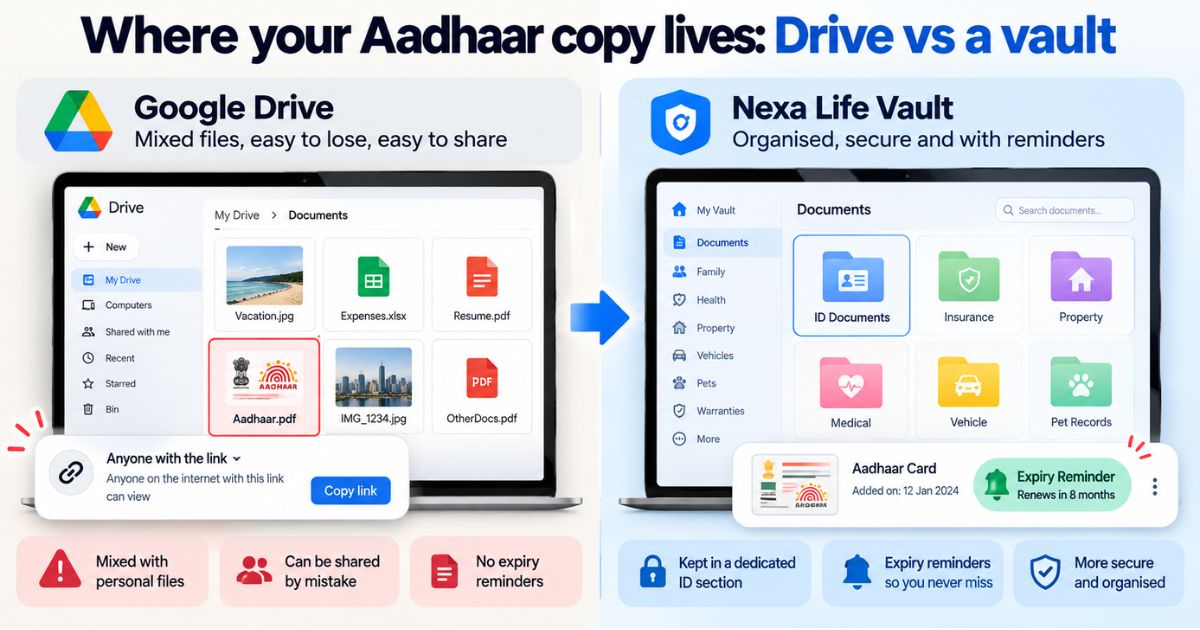
Cloud storage platforms make sharing files quick and convenient. However, many users accidentally share sensitive information with the wrong people or grant broader access than intended.
Examples include:
- Sharing confidential documents publicly
- Sending links to the wrong recipient
- Granting editing access instead of view-only access
- Leaving shared folders accessible after a project ends
Before sharing any file, it's important to review permissions carefully and confirm that only authorized individuals can access the information.
Public Links and Open Access Settings
Many cloud platforms allow users to generate public links that can be accessed by anyone who has the URL.
While this feature is useful for collaboration, it can also create security risks if sensitive files are accidentally exposed.
Organizations and individuals should regularly review shared links and disable access when files no longer need to be publicly available.
Phishing Attacks
Cybercriminals often use phishing emails and fake login pages to steal cloud storage credentials. These attacks are designed to look legitimate and can be difficult to identify.
Warning signs may include:
- Unexpected login requests
- Emails claiming your account will be suspended
- Requests to verify account information urgently
- Links leading to unfamiliar websites
Always verify the sender and access cloud accounts through official websites rather than clicking links in suspicious emails.
Data Breaches and Unauthorized Access
Although major cloud providers invest heavily in security, unauthorized access can still occur if accounts are compromised.
Attackers may attempt to gain access through stolen passwords, malware infections, or security vulnerabilities.
Regular account monitoring, strong authentication methods, and security alerts can help identify suspicious activity before significant damage occurs.
Accidental Deletion and Data Loss
Many users assume that storing files in the cloud automatically protects them from data loss. However, files can still be accidentally deleted, overwritten, or corrupted.
This is why cloud storage should be viewed as part of a broader data protection strategy rather than the only backup solution.
Maintaining additional backup copies of critical files helps ensure important information remains recoverable if something goes wrong.
Ignoring Account Activity and Security Settings
Many cloud storage platforms provide security features such as login notifications, access logs, device management, and activity monitoring. Unfortunately, these features are often overlooked.
Regularly reviewing account activity can help detect unusual behavior, unauthorized logins, or suspicious file access.
The earlier a security issue is identified, the easier it is to prevent serious consequences.
Understanding these common risks is the first step toward building a more secure cloud storage environment. In the next section, we'll explore practical cloud storage best practices that can help protect your files and reduce security threats.
Cloud storage can help protect important information, but it should be supported by a comprehensive backup plan. Discover practical strategies for protecting your files in our guide on Backup Your Important Digital Files.
Cloud Storage Best Practices for Better Security
Understanding the risks associated with cloud storage is important, but taking action is what truly protects your information. Whether you're storing personal documents, business files, photos, or backups, following proven cloud storage best practices can significantly reduce security risks.
The goal is not only to keep files accessible but also to ensure they remain protected from unauthorized access, accidental exposure, and data loss.
Use Strong and Unique Passwords
Your cloud storage account is only as secure as the password protecting it. Weak passwords remain one of the most common causes of account compromises.
Create a unique password specifically for your cloud storage account and avoid reusing passwords from other services.
Strong passwords should be:
- At least 12–16 characters long
- Unique to the account
- Difficult to guess
- Free from personal information
Using a password manager can help generate and securely store strong passwords for multiple accounts.
Enable Multi-Factor Authentication (MFA)
Multi-factor authentication adds an additional layer of security beyond your password.
Even if someone obtains your login credentials, MFA requires a second verification step before access is granted.
Most cloud storage providers support authentication methods such as:
- Authentication apps
- SMS verification codes
- Email verification
- Hardware security keys
Enabling MFA is one of the simplest and most effective ways to improve cloud account security.
Review File Sharing Permissions Carefully
Cloud storage platforms make collaboration easy, but improper sharing settings can expose sensitive information.
Before sharing files or folders, review permission settings carefully.
Consider using:
- View-only access when editing isn't required
- Password-protected shared links
- Expiration dates for shared files
- Restricted access for confidential information
Limiting access to only those who need it helps reduce unnecessary security risks.
Encrypt Sensitive Files
Encryption helps protect information by converting it into a secure format that can only be accessed by authorized users.
Many cloud providers automatically encrypt data during storage and transmission. However, highly sensitive files may benefit from additional encryption before they are uploaded.
This extra layer of protection can be especially useful for:
- Financial documents
- Legal agreements
- Medical records
- Business contracts
- Personal identification documents
Encryption helps ensure that even if files are accessed without authorization, the information remains protected.
Organize Important Files Properly
A well-organized cloud storage system improves both security and productivity.
When files are organized into logical folders and categories, it becomes easier to locate important information, manage permissions, and identify outdated or unnecessary files.
Good organization practices include:
- Creating clear folder structures
- Using consistent file naming conventions
- Separating personal and business files
- Removing duplicate documents
- Archiving outdated records
Proper organization also reduces the likelihood of accidentally sharing the wrong files.
Protect Your Most Valuable Digital Assets
Not all files require the same level of protection. Some digital assets are far more valuable than others and should receive additional security attention.
Examples include:
- Identity documents
- Financial records
- Business data
- Intellectual property
- Legal agreements
- Personal archives and backups
By combining strong passwords, MFA, secure sharing practices, encryption, and proper organization, you can create a safer cloud storage environment that protects valuable information while maintaining easy access when needed.
Create a Reliable Cloud Backup Strategy
Many people assume that storing files in the cloud automatically protects them from every type of data loss. While cloud storage provides an additional layer of protection, it should not be considered your only backup solution.
Files can still be accidentally deleted, overwritten, corrupted, or affected by account access issues. That's why a reliable backup strategy is an important part of cloud storage security.
Maintaining multiple copies of important files helps ensure that valuable information remains available even when unexpected problems occur.
Follow the 3-2-1 Backup Rule
One of the most widely recommended backup strategies is the 3-2-1 rule.
This approach involves:
- Keeping 3 copies of important data
- Using 2 different storage methods
- Storing 1 copy in a separate location
For example, you might keep the original file on your computer, a copy in cloud storage, and another backup on an external drive.
This strategy reduces the risk of losing important information due to hardware failures, accidental deletion, or cyber incidents.
Monitor Account Activity Regularly
Most cloud storage providers offer account activity logs that show login history, file access, and sharing activity.
Reviewing these logs regularly can help identify suspicious behavior before it becomes a serious security issue.
Look for signs such as:
- Unknown login locations
- Unrecognized devices
- Unexpected file downloads
- Unauthorized sharing activity
- Changes to account settings
Early detection can help prevent unauthorized access and minimize potential damage.
Remove Unnecessary Access
Over time, cloud storage accounts often accumulate shared folders, old collaborators, and unused integrations.
Review permissions periodically and remove access that is no longer required.
This is especially important for businesses where employees, contractors, or partners may no longer need access to specific files.
Limiting access reduces security risks and helps maintain better control over sensitive information.
Keep Important Files Organized
A cluttered cloud storage account can make it difficult to locate important documents and manage security settings effectively.
Regularly organizing files helps improve productivity while reducing the risk of accidental exposure or deletion.
Consider:
- Creating structured folder systems
- Archiving older files
- Removing duplicate documents
- Reviewing file permissions regularly
- Keeping sensitive files in restricted folders
Good organization makes cloud storage easier to manage and more secure over the long term.
Review Your Security Settings Periodically
Cloud platforms regularly introduce new security features and controls. Taking time to review your account settings can help ensure you're using the latest protection options available.
Check your account for:
- Multi-factor authentication status
- Recovery email and phone number accuracy
- Connected devices
- Third-party app permissions
- File sharing settings
Small security improvements can have a significant impact on protecting valuable information.
Conclusion
Cloud storage offers a convenient and efficient way to store, access, and share important files. However, convenience should always be balanced with strong security practices.
By following proven cloud storage best practices, such as using strong passwords, enabling multi-factor authentication, managing file permissions carefully, encrypting sensitive information, and maintaining reliable backups, you can significantly reduce security risks.
Whether you're protecting personal documents, business records, financial information, or digital assets, a proactive approach to cloud security helps ensure your files remain safe and accessible when you need them most.
For more resources on protecting important online accounts, digital files, and sensitive information, visit our Digital Vault page.
Frequently Asked Questions
cmp6hs57y000oc2bxnj5buqzv
Editorial Contributor
Author and technology contributor at NexaLifeVault.
Share this post
Comments (0)
No comments yet. Be the first to comment!